
|

|
|
|
|
File size: 1452 Kb Date: 09/06/2015 Homepage Install support: Install and Uninstall OS: WinXP, WinVista, Win7 x32, Win2000, Windows2000, Windows2003, WinServer, Windows Vista Ultimate, Windows Media Center Edition 2005, Windows Vista Starter, Windows Vista Home Basic, Windows Vista Home Premium, Windows Vista Business, Windows Vista Enterprise Requirements: ODBC, OLE DB, IDAPI or Oracle Call Interface Language: English | compare data or free compare tables and cheap compare data rows or the data synchronization, good db comparison or also db sync | DTM Data Comparer 1.25.01 [Homepage] - by: DTM soft - Download links for DTM Data Comparer 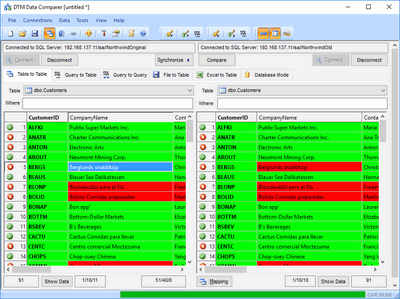 Click to enlarge Description: DTM Data Comparer is a visual tool for data comparison and synchronization. The program successively views the contents of both tables basing on the order of ascending of Primary Key (or unique key) values. If the program cannot find two records with the same key value, it places the records to different lines and highlights in yellow. If values of the keys coincide, the program places them to the same lines and highlights equal fields in green and unequal fields in red. When you use mapping, the program leaves columns that don't take part in comparison white. During synchronization, the program makes the contents of the secondary table equal to the contents of the primary one. In this process records absent in the primary table will be deleted from the secondary one, records that differ will be updated, while records absent in the secondary table will be inserted from the primary one. You can change this behavior using the following options: 1) Delete from secondary - disabling this option will block deleting a record from the secondary table even if there is no such record in the primary table. 2) Insert by primary - disabling this option will block adding records from the primary table even if there are no such records in the secondary table. "Mapping" feature allows comparing two tables that have different structure (number and name of fields). During synchronization the program creates a set of insert, update and delete statements for data synchronization. The user can select the necessary statements or forbid the unnecessary ones in a special dialog box. Recent changes in this Major Update: Remarks - Comments - Reviews (Add your opinion about this program) |
See also in Business and Finance: Database and Analytics
|
|


 Download:


