|
|
|
||||
|
|
Want a better software to manage your Web site more quickly and efficently? Click here for more info about EasyWebEditor...
Websites and CD DVD product catalogs with a single professional tool, in a single step? Yes it is possible: HyperPublish (BELOW!) FREE DOWNLOAD LINKS FOR: symbol 4.0.0 Symbol Character Map, enables you to select the font, view available characters and symbols, copy a selection's to your favorite text editor. Simply double-click the characters they will be grouped for copy later, or drag and drop a character to your favorite text editor. (description, more information, click here - Symbol Character Map, select font, view characters, copy or drag and drop a char) File size: 3716 Kb Free Download link 1: Click here to start the download for symbol (then choose Save) Click here to start the download for symbol (then choose Save)Free Download link 2: http://www.mdsw.com/programs/symbol/symbol.exeWARNING: we suggest to scan the files with an antivirus before installing them - we do our best to screen each file reviewed on GetSoftware, but we don't re-scan them each day, and so, better safe than sorry! The download link was perfectly working at the time of our review and the related inclusion in this archive, and so when we did our last test; the download is not on our servers, it is provided by the software house and sometimes can be -temporarily- offline or so. Please kindly use the contact form to report difficulties, strange behaviors or persistent problems, and quote the program name or the number 8594 . Symbol Character Map, enables you to select the font, view available characters and symbols, copy a selection's to your favorite text editor. Simply double-click the characters for copy later, or drag and drop a character to your favorite text editor(Symbol Character Map, select font, view characters, copy or drag and drop a char)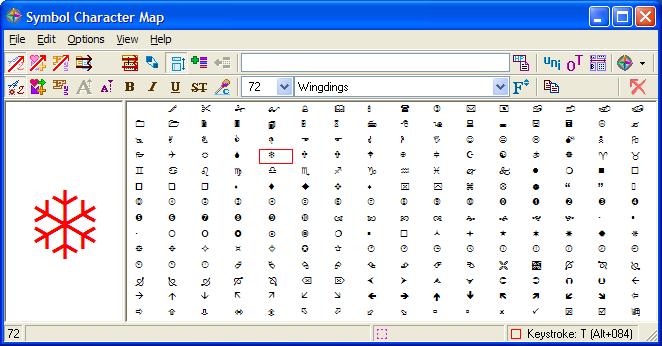 Download page for the app symbol - Symbol Character Map gives you the possibility to choose between several preset maps from a drop-down list. The content of the selected map with symbols is revealed directly in the main window. If you happen to think that the characters are displayed with a small font, you may enable the larger display for more accurate viewing options.
What's more, you can click on a symbol and preview it in a dedicated panel using a large font. You may also alter the previewing mode by changing the size of the letters, modifying the font color, and enabling the bold, italic, underline, or strikethrough mode. Fast copying actions can be employed for transferring the selected symbol to your documents. You can either appeal to clipboard actions (copy/paste) or drag and drop the target symbol to the preferred window. A list with favorite symbols can be created on the fly. Other important options enable you to show all fonts, symbol fonts, or only favorite ones, print the information, close the utility upon copying symbols to the clipboard or dragging and dropping them to another document, enable Unicode support, and keep the tool on top of other panels. Symbol Character Map comes packed with several handy features for helping you make use of a multitude of symbols with ease. 
|
||||
|
|


