
|

|
|
|
|
Program type: Freeware File size: 166874 Kb Date: 12/04/2023 Homepage Install support: Install and Uninstall OS: Win2000, WinXP, Win7 x32, Win7 x64, Windows 8, Windows 10, WinServer, WinOther, WinVista, WinVista x64 Requirements: Microsoft Windows 11/10/8/7/XP Service Pack 3; Intel Core i3 or AMD Athlon II X2 processor or faster Language: English, Chinese, ChineseSimplified, Dutch, French, German, Italian, Latvian, Polish, Russian, Spanish | document conversion and cheap automated conversion server or the pdf conversion server, good print pdf automatically or also hot folder printing | FolderMill 5.1.2312.4160 [Homepage] - by: fCoder SIA - Download links for FolderMill 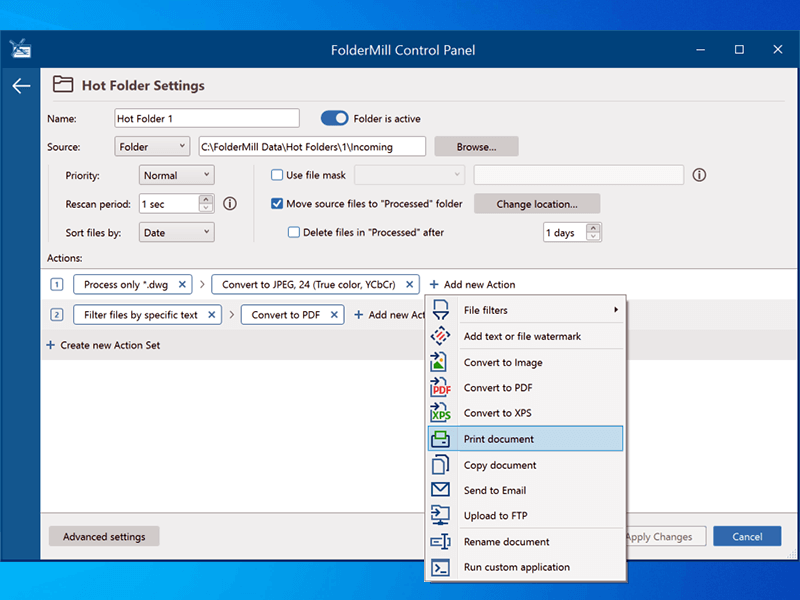 Click to enlarge Description: FolderMill monitors a folder and automatically prints or converts all new documents and image files to PDF, JPG, PNG, or TIFF. The system administrator defines special 'Hot folders' for monitoring and sets Actions to be performed. After this, all employees in the office can print documents or create PDFs as simple as copying files! FolderMill supports all popular types of office documents including Microsoft Office Word files, RTF and plain text documents, Excel files, PowerPoint presentations, Visio drawings and charts, Microsoft Office Publisher and Adobe PDF files, XPS, JPG, PNG, PCX, DCX, Bitmap, GIF, TGA, TIFF images, and other documents. FolderMill streamlines the conversion of all incoming files to PDF, JPG, PNG, or TIFF with very few efforts - simply place the files into one folder and take them out from another one! To print or convert the documents all the company employees need to do is to place them into one of the 'Hot Folders'. There is no need to open every file individually, just select the desired Action and configure its parameters. What's new in FolderMill 5.0: - New Multitasking mode - to process many files at a time - Task Manager - a convenient way to monitor tasks - New Action: 'Upload to FTP' - New Action: 'Send to Email' - New Action: 'Convert to XPS' - New Action: 'Filter by number of pages' - Processing of XLS, XLSX, CSV Excel files without Microsoft Office - Processing of EML, MSG message files without Microsoft Outlook - Faster (much faster) processing of files - Ability to change Color/Grayscale mode by page range for 'Print Document' Action - Ability to change opacity for image watermark - Ignoring attachments of unknown type (by default) - Support for eDrawings Viewer 2022 - Support for Windows 11 and Windows Server 2022 OS - New supported file types: VCF, ICS, EMLX, HEIC - Other fixes and improvements Recent changes in this Major Update: Remarks - Comments - Reviews (Add your opinion about this program) |
See also in Utilities and Hardware: Printers
|
|


 Download:


