
|

|
|
|
|
File size: 50180 Kb Date: 01/06/2020 Homepage Install support: Install and Uninstall OS: Win2000, WinXP, Win7 x32, Win7 x64, Windows 8, Windows 10, WinServer, WinOther, WinVista, WinVista x64 Requirements: N Language: English, Dutch, French, German, Japanese, Spanish | iPhone manager, transfer photo and iTunes alternative or free music manager and cheap flash drive for iPhone or the backup iPhone, good make iPhone ringtone or also remove iTunes DRM, iTunes DRM removal and convert HEIC to JPEG | WinX MediaTrans 6.8 [Homepage] - by: Digiarty Software, Inc. - Download links for WinX MediaTrans 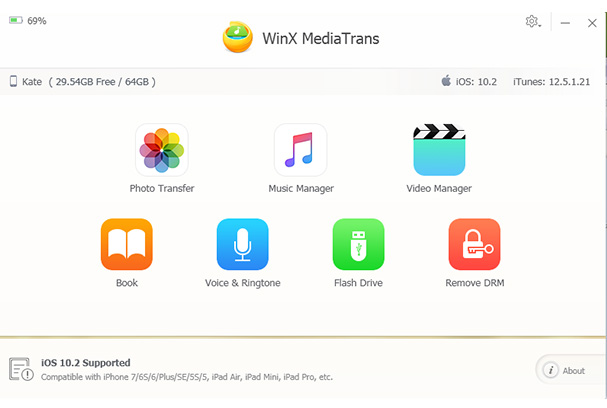 Click to enlarge Description: Download easiest iPad iPhone transfer and manager that truly replaces iTunes, uniquely remove DRM from iTunes store purchases like movies, music and audio books; export to PC and make the purchased movies playable on more devices; backup and transfer your photos, videos, music files, iTunes U, Podcast, Voice Memos without iTunes; sync, manage and build music playlists from iPhone X/8/7/6S/5S to PC Windows (10). It also turns iPhone into a free USB flash drive; convert MKV AVI FLV for sync to iDevices, convert music to MP3/AAC; import/export iBook, and convert EPUB to PDF, TXT and HTML. Make/transfer iPhone ringtone. Key Features: 1. Unique! Remove DRM from iTunes Store purchases and export to PC. 2. Transfer videos music photos ringtones ebooks, podcast, etc without installing iTunes in PC. Sync/add/edit/delete/manage iOS files at ease 3. Support Intel QSV & Nvidia NVENC hardware acceleration, making it world's No.1 fast transfer. 4. Auto convert MKV, FLV, AVI, etc videos to MP4 for iDevice.Convert music files to AAC/MP3. 5. Turn iPhone to free USB to store any files, from Word, to Excel, PDF, apps, etc. 6. Import/export iBook, and convert EPUB to PDF, TXT and HTML. 7. Make iPhone ringtones by waveform cropping, export /delete ringtone. 8. Convert HEIC to JPEG. 9. Encrypt your private photos and videos transferred from iOS to PC. How to transfer photos from iPhone to PC without iTunes? Step 1, Click into "Photo Transfer" on the main interface. Step 2, Select photos you want to transfer to PC. Step 3, click "Export" to start transferring iPhone photos to PC How to Sync Music from Computer to iPhone 7/6S without iTunes Step 1: Launch this best iPhone (7) music transfer software. Step 2: Click "Music Manager" and then select the songs/playlists from computer you'd like to sync to iPhone by clicking "Add Music" button. Step 3: Start syncing music from computer to iPhone 7/7 Plus/6S Recent changes in this Major Update: Remarks - Comments - Reviews (Add your opinion about this program) |
See also in Utilities and Hardware: File and Disk Management
|
|


 Download:


