
|

|
|
|
|
File size: 3291 Kb Date: 07/05/2011 Homepage Install support: Install and Uninstall OS: WinXP, WinVista, WinVista x64, Win7 x32, Win7 x64, Win2000, Windows2000, Windows2003, Windows Vista Ultimate, Windows Vista Ultimate x64, Win98, WinME, WinNT 4.x, Windows Vista Starter, Windows Vista Home Basic, Windows Vista Home Premium, Windows Vista Business, Windows Vista Enterprise, Windows Vista Home Basic x64, Windows Vista Home Premium x64, Windows Vista Business x64, Windows Vista Enterprise x64 Requirements: A standart windows PC Language: English, Chinese, French, German, Italian, Javanese, Russian | rename files, file renamer and file rename or free mp3 rename and cheap multiple rename or the OuickRename, good multi rename or also utility, software | Visual Renamer 1.9 [Homepage] - by: Softplicity - Download links for Visual Renamer 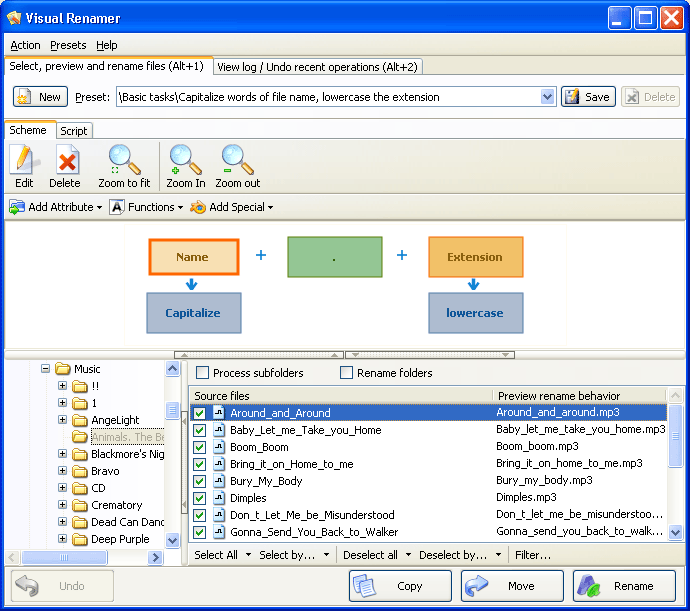 Click to enlarge Description: Visual Renamer - you won't imagine renaming template that it can not perform! This most powerful batch renaming tool is unique. Apart from common features of batch renaming, preview & undo options, it can rename karaoke files, supports THM, EXIF, MP3 tags, and has lots of different filters to sort out files, including manual sorting. Besides, Visual Renamer allows you to create your own custom scripts. Any renaming can be done if you have Visual Renamer. You could assume Visual Renamer is too complicated for a regular user. Nothing like that! No command lines, no obscure mask functions, no complicated rules.VisualRenamers employs WYSIWYG function (what you see is what you get) to make batch renaming a simple and straightforward process. Renaming functions including but not limited to enumerating, extension swapping, replacing umlauts and other non-standard characters with ASCII characters are done in few clicks. While VisualRenamer was created with professional users in mind (designers, programmers, webmasters and other categories), software primary target are inexperienced users who have large mp3 file collections and own digital camera, and thus can take advantage of a batch renamer that saves time and requires no special knowledge to operate. Any renaming can be EASILY done if you have Visual Renamer. Recent changes in this Major Update: Remarks - Comments - Reviews (Add your opinion about this program) |
See also in Utilities and Hardware: File and Disk Management
|
|


 Download:


