
|

|
|
|
|
Program type: Freeware File size: 737 Kb Date: 11/12/2010 Homepage Install support: Install and Uninstall OS: WinXP, Windows2000, Windows2003, Windows Vista Ultimate, Windows Vista Ultimate x64, Win98, WinME, Windows Vista Starter, Windows Vista Home Basic, Windows Vista Home Premium, Windows Vista Business, Windows Vista Enterprise, Windows Vista Home Basic x64, Windows Vista Home Premium x64, Windows Vista Business x64, Windows Vista Enterprise x64 Requirements: Windows 98/ME/2000/XP/Vista/7/2008 x86 and x64 editions, 64 Mb RAM, 2 Mb disk space Language: English | folders or also synchronize, automate and files or free automate and cheap backup or the flash drive | CarbonFolder 1.3 [Homepage] - by: NeoWise Software - Download links for CarbonFolder 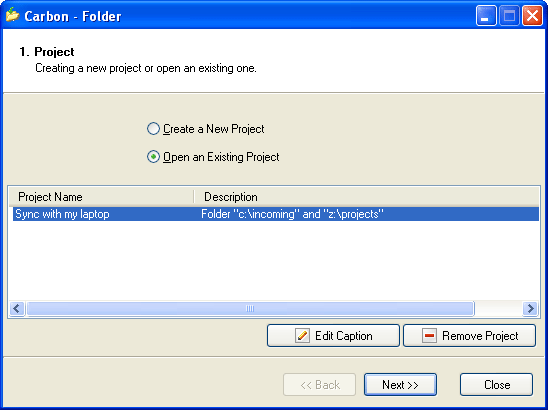 Click to enlarge Description: CarbonFolder is a small and extremely simple in use utility for synchronization of files in local folders and folders in local network. For instance, it lets you perform fast synchronization of files on your desktop PC and a notebook in the local network. There is no doubt that the synchronization of data is quite an exhausting process, especially when it is performed manually. CarbonFolder allows you to automate this process without any efforts. For your convenience, any newly created task can be saved for the next launch. The synchronization of files with CarbonFolder is easy as a pie: all the user has to do is to start the program and follow the instructions of the wizard. The full process takes just 5 steps. Firstly, the utility offers you to create a new project or open an existing one. Secondly, source and destination folders should be selected. Thirdly, the synchronization mode should be specified. It can be done in two ways: bidirectional or unidirectional. Besides, it is possible to make an exact copy of folder 1 in folder 2, include subfolders or use advanced options like including or excluding particular files from synchronization. After that, the user should verify synchronization parameters, click the "Synchronize Folders" button and the task is completed. Finally, the program asks if the user wants to save the task or not. The best thing about CarbonFolder is its total simplicity and ease of use. The program has a simple interface designed as a step-by-step wizard, which is very common among Windows applications and is clear to any user. It takes you just a minute and a few clicks to synchronize data. CarbonFolder supports Microsoft Windows 98/Me/NT/2000/2003/XP/Vista. Recent changes in this Major Update: Remarks - Comments - Reviews (Add your opinion about this program) |
See also in Utilities and Hardware: File and Disk Management
|
|


 Download:


