
|

|
|
|
|
File size: 13290 Kb Date: 03/02/2011 Homepage Install support: Install and Uninstall OS: WinXP, Windows2000, Windows2003, Windows Vista Ultimate, Windows Vista Ultimate x64, Windows Media Center Edition 2005, Windows Vista Starter, Windows Vista Home Basic, Windows Vista Home Premium, Windows Vista Business, Windows Vista Enterprise, Windows Vista Home Basic x64, Windows Vista Home Premium x64, Windows Vista Business x64, Windows Vista Enterprise x64 Requirements: Windows 2000 and up; Office 2000 and up; Adobe 4.0 and up, Ghostscript 7.07 and up; IE 5.0 and up. Language: English, ChineseSimplified, ChineseTraditional, French, German, Italian, Japanese, Russian, Spanish | file conversion and image conversion or free doc conversion and cheap document conversion or the pdf conversion, good convert to image or also convert to PDF, pdf to tiff and peernet | File Conversion Center 4.0.008 [Homepage] - by: PEERNET Inc. - Download links for File Conversion Center 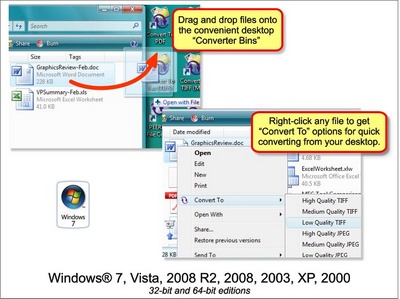 Click to enlarge Description: File Conversion Center makes converting documents easy. Able to convert documents such as Word, Excel and PowerPoint files, Adobe PDF files, PostScript files, HTML files and web pages, as well as other popular file formats into non-searchable Adobe PDF documents, TIFF, JPEG and other image file formats. Just right-click on a file or folder in Windows Explorer and select a conversion option from the Convert To menu to begin converting. You can also drag and drop the files and folders onto a desktop converter bin, one of the Convert To icons installed on your desktop. Features include: Powerful Batch Processing Capabilities - Convert any number of files, folders, and web addresses. Pause, resume, skip a file or cancel the conversion process from the progress dialog. Desktop Integration - Integrated into both your desktop and your Windows Explorer application, you can convert individual files or groups of files on demand, quickly and easily. Dynamic List of Supported File Types. Customizable Conversion Settings - Custom conversion settings can be created to meet your specific needs; output file type, resolution, color, serialized or multi-paged files, compression options and output file location, as well as auto-rotating landscape pages, trimming white space, cropping and resizing can all be configured. Convert Folders and Subfolders - Folders can be processed recursively, saving the converted files with the source file, or in a new location with the same directory structure. Folder Contents Filtering - Folder contents can be filtered by file type to convert only the files you want. Convert and Print at the Same Time - Convert documents into image files and send them to your office printer with the same mouse click, simplifying your workflow process and saving you time. Many Common Output Types -Create non-searchable Adobe PDF files as well as TIFF, JPEG, and many other common image file formats. Fully 30 day trial avialble. Recent changes in this Major Update: Remarks - Comments - Reviews (Add your opinion about this program) |
See also in Utilities and Hardware: Converters
|
|


 Download:


