
|

|
|
|
|
Program type: Freeware File size: 820 Kb Date: 06/28/2008 Homepage Install support: Install and Uninstall OS: Win2000, WinXP, WinVista, Windows2000, Windows Vista Starter, Windows Vista Home Basic, Windows Vista Home Premium, Windows Vista Business, Windows Vista Enterprise, Windows Vista Ultimate Requirements: Language: English | string replace or the search and replace, good find and replace or also search replace, find replace and replace text or free multi replace and cheap multiple replace or the replace characters, good text converter or also convert text, morse code and unicode or free rot13 and cheap transcription or the transliteration, good romanization or also phonetics | wReplace 1.2.Free [Homepage] - by: SharkTime Software - Download links for wReplace 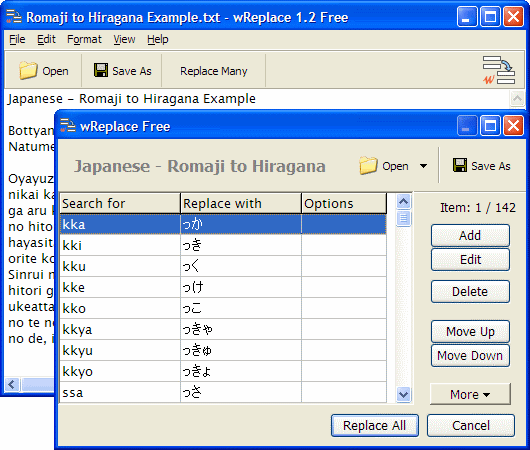 Click to enlarge Description: Free program, which allows you to change/replace multiple letters and phrases at a time.It is easy to create and save lists of changes/replacements, so that you can reuse them.You can even paste replacement table from your spreadsheet (e.g. Excel/Calc).wReplace resembles Notepad. Like Notepad, it works with plain text Unicode files.Applications:* Character conversion - changing one set of characters into another. Also, removing diacritics (accents).* Romanization (latinisation) - conversion of a text written in a non-Roman alphabet into Roman alphabet.* Transliteration - writing down a text (or a word) written in one alphabet with letters of another alphabet.* Cyrillization - conversion of a text written in a non-Cyrillic alphabet into Cyrillic alphabet.* Transcription (phonetics, phonemics, phonemic orthography) - writing down phonemes of a spoken language, so that you can reproduce them later. Also, you may write down phonemes of one language using letters of another.* Simple substitution cipher (e.g. ROT13, ROT47).* Morse code conversion.Remove Diacritics:wReplace is an excellent tool for national characters conversion into standard set of ASCII characters. This is useful because many programs do not correctly display non-ASCII national characters; for example, programs which display film subtitles sometimes have this problem. The change/replacement is run according to a pattern (Diacritic to ASCII) available in the program.Learning languages:wReplace is useful for language learning. It allows you to convert between different notations/writing systems, and to approximately phonetically transcribe text. Possible applications:* Japanese, text conversion both ways: Romaji - Hiragana, Romaji - Katakana, Katakana - Hiragana.* Russian; Cyrillic, conversion into Latin phonetic transcription ISO 9-1995.wReplace can be used free of charge. Recent changes in this Major Update: Remarks - Comments - Reviews (Add your opinion about this program) |
See also in Utilities and Hardware: Automation
|
|


 Download:


