
|

|
|
|
|
File size: 1351 Kb Date: 03/03/2015 Homepage Install support: Install and Uninstall OS: WinXP, WinVista, WinVista x64, Win7 x32, Win7 x64, WinServer Requirements: Internet connection Language: English | Network Connection check and cheap tethering or the tether, good internet check or also internet speed test, speedtest and signal strength | TetherCheck for Windows 1 [Homepage] - by: bizmodeller.com - Download links for TetherCheck for Windows 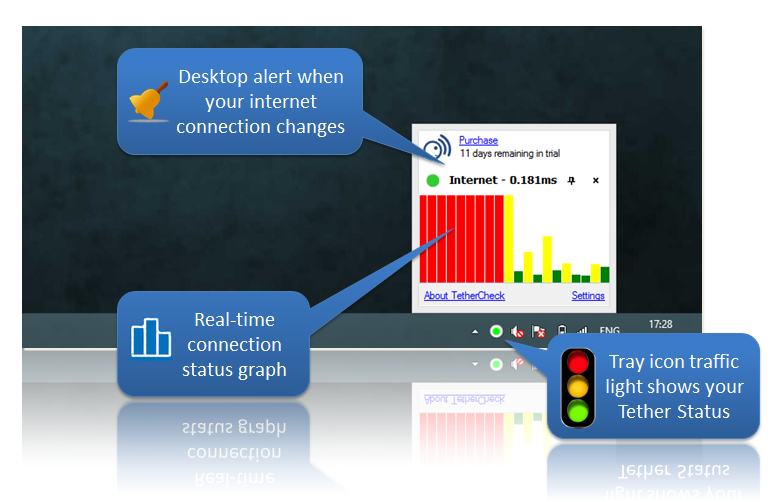 Click to enlarge Description: Tether Check is ideal for Windows laptop users who tether their computer to their phone or dongle. Tether Check will keep you notified about your phone's real internet connection status so you can get the most out of your mobile internet connection. If you tether your mobile phone's 3G or 4G internet connection to your laptop, you'll be aware of the frustration when you suddenly lose phone reception and their internet drops out. You know you can't trust the Windows network tray icon as it just tells you the connection strength between your computer and your phone. So you end up constantly pressing F5 to refresh your web page in the hope that you get back into an area with network coverage. Things are different if you have Tether Check installed. When your phone's connection is dropped and restored, a Tether Check alert will let you know you can start work or refresh that web page, saving you time and making you more productive. The Tether Check app runs on Windows laptops and desktops, but can monitor the status of all tethering mobile phone devices including iPhone, Android, Windows Phone, Blackberry, etc. Tether Check is a fantastically simple solution to a very common problem for today's tethered laptop users. Tether Check is also perfect if use 3G/4G dongles or even if you use conventional broadband and have a poor connection that you want to monitor. Recent changes in this Major Update: Remarks - Comments - Reviews (Add your opinion about this program) |
See also in Internet and communication: Miscellaneous and all-in-one
|
|


 Download:


