
|

|
|
|
|
Program type: Freeware File size: 346 Kb Date: 12/04/2011 Homepage Install support: Install and Uninstall OS: WinXP, WinVista, Win7 x32, Windows Vista Ultimate, Windows Vista Starter, Windows Vista Home Basic, Windows Vista Home Premium, Windows Vista Business, Windows Vista Enterprise Requirements: .Net 2.0+, 1M free space Language: English | image or the photo, good print or also utility, poster | Poster It 1.1 [Homepage] - by: Greatis Software - Download links for Poster It 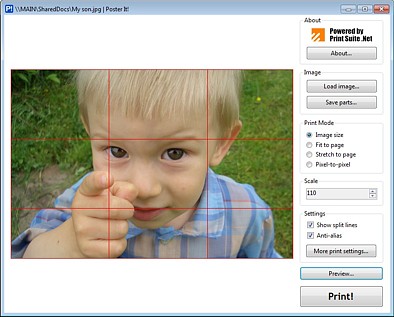 Click to enlarge Description: Poster It! is an image print utility that allows printing of your image on multiple pages by simple steps:Run Poster It!Load image by clicking on the "Load image..." button, by clicking on the program logo or by dragging file from Explorer.Setup your printout as you need with the "Print mode" and "Scale". The "Image size" mode allows multipage printing, so if your image is too large for printing on the one page, it will be split and printed on several page. By default, "Image size" mode prints image in its native resolution using image size and DPI of image and printer, but you can change the target size with the "Scale" parameter. This parameter works for the "Fit to page" mode too. 100% is size of image fitted to page, when "Scale" is more than 100% in this mode, the image will be clipped. The "Stretch to page" mode stretches image to entire page with potential proportional distortions. The "Scale" parameter is not used in this mode. "Pixel-to-pixel" mode prints the image in the printer resolution. If printout has multiple pages, the image display grid that shows how image will be split. The "Print settings..." button calls standard print settings windows. When you printout is ready to print, you can print it immediately with "Print!" button or preview it by clicking on "Preview..." button. Preview window has "Print" button too, so you can run printing from the preview window.If you have not printer right now, no problem - you can save parts of split image. Just click the "Save parts..." button, choose target folder and you'll have all the image parts in separated files. Recent changes in this New Release: Remarks - Comments - Reviews (Add your opinion about this program) |
See also in Graphic Painting and Drawing: Image Editing
|
|


 Download:


