
|

|
|
|
|
File size: 175382 Kb Date: 04/30/2012 Homepage Install support: Install and Uninstall OS: WinXP, WinVista, WinVista x64, Win7 x32, Win7 x64, Win2000 Requirements: Works in AutoCAD 3D environment only. Language: English, French, German, Italian, Spanish | autocad and finite element method or free finite element and cheap analysis or the stress, good frequency or also buckling, thermal and strength or free force and cheap temperature or the elasticity, good fatigue | AutoFEM Analysis 1.7 [Homepage] - by: AutoFEM Software LLP - Download links for AutoFEM Analysis 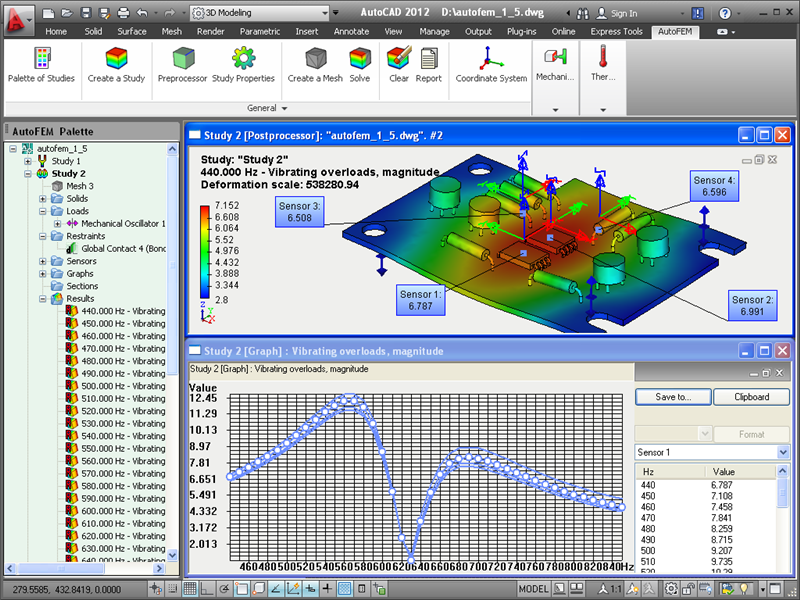 Click to enlarge Description: AutoFEM Analysis is the finite element analysis software. The main feature of the system is its deep integration with AutoCAD Using AutoFEM Analysis, an AutoCAD user gets a possibility to solve the problem of finite-element modeling of various physical phenomena: Static analysis (analysis of structural stress and strain) - the AutoFEM Static Analysis module; Stress analysis for structures under cyclic loading action - the AutoFEM Fatigue Analysis module; Calculation of natural frequencies (resonances) of structures - the AutoFEM Frequency Analysis module; Calculation of critical load (the system's stability) - the AutoFEM Buckling Analysis module; Calculations of temperature (or distribution of temperature domains) - the AutoFEM Thermal Analysis module . The general algorithm of working with AutoFEM Analysis is as follows: First, the user should create a three-dimensional (3D) model of the product in the AutoCAD 3D environment. Then, without leaving AutoCAD, the user should create the problem of finite element analysis, referred to as the Study. The model is loaded into an AutoFEM Analysis Preprocessor integrated into AutoCAD. Using the Preprocessor, the user specifies external and internal parameters of simulated physical phenomena (finite element mesh, boundary conditions, materials, etc.) and transmits the Study to an AutoFEM Analysis processor. The AutoFEM Analysis processor creates and solves systems of algebraic equations in accordance with the finite element method. With the help of an AutoFEM Analysis post-processor, the user performs analysis of results and develops the accompanying documents, i.e. reports, video, avi, etc. Users of AutoCAD become able to perform the finite element analysis in the usual and familiar software environment. Recent changes in this Major Update: Remarks - Comments - Reviews (Add your opinion about this program) |
See also in Graphic Painting and Drawing: CAD and 3D
|
|


 Download:


