
|

|
|
|
|
File size: 5888 Kb Date: 02/17/2015 Homepage Install support: Install and Uninstall OS: WinXP, WinVista, WinVista x64, Win7 x32, Win7 x64, Win2000, Windows Vista Ultimate, Windows Vista Ultimate x64, Windows Vista Starter, Windows Vista Home Basic, Windows Vista Home Premium, Windows Vista Business, Windows Vista Enterprise, Windows Vista Home Basic x64, Windows Vista Home Premium x64, Windows Vista Business x64, Windows Vista Enterprise x64, Mac OS X 10.5, Mac OS X 10.4, Mac OS X 10.6, Mac OS X 10.7, Mac OS X 10.8, Windows 8 Requirements: Open GL capable GFX with at least 32MB. Pentium 3 or higher, 256MB system RAM Language: English | particle effects, good particle effects generator or also smoke effects, fire effects and particles or free bubble effects and cheap fire generator or the smoke generator, good explosion generator or also sprite sheets, electrical effects and laser beams or free sparks and cheap flares | TimelineFX Particle Effects Editor 1.30 [Homepage] - by: RigzSoft.co.uk - Download links for TimelineFX Particle Effects Editor 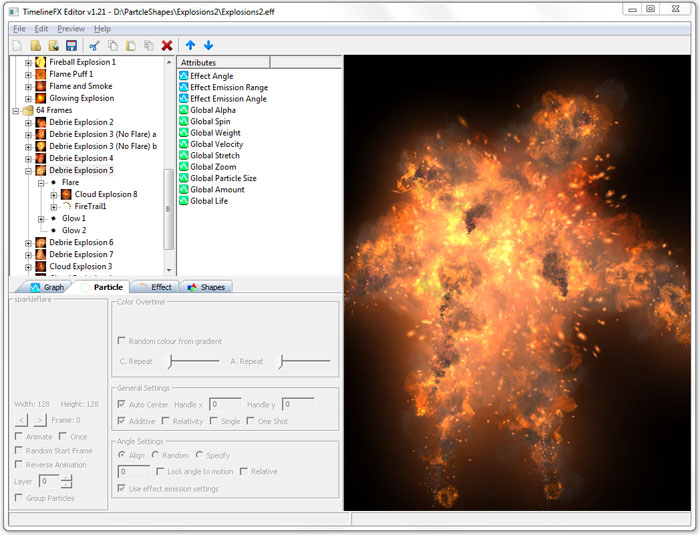 Click to enlarge Description: The TimelineFX Particle Editor is a complete solution for creating a full range of particle effects for your games and applications. Export the particle effects as static animations onto sprite sheets, animation strips or image sequences in PNG format, or if you develop for the iPhone or iPad, you can export using the PVRTC format (Mac only). If you program games using the powerful Blitzmax programming language, you can also use the effects directly using the TimelineFX Module.Create an endless amount of different and varied particle effects including explosion effects, smoke effects, fire effects, water effects, steam effects, bubble effects, and much more! Animations can be easily configured to loop seamlessly with just one click of the mouse, and with another click, you can even make animations tile seamlessly too for use as animated textures.The TimelineFX Particle Effect Editor uses a powerful graphing system to provide full control over your effects. This means that every aspect of your effects can be precisely controlled over the life time of the effect. Just select an attribute such as size overtime, and plot it's behaviour on the graph tab to easily make all the particles spawned by an emitter grow or shrink over the lifetime of the particle.Many attributes are available for you to finely tune your particle effects, such as, amount, life, velocity, spin, stretch, alpha and many more.Just plot all your points on the graph according to how you want your particles to behave, and if you want even more precise control, convert graph points to curves for even smoother results. Recent changes in this Major Update: Remarks - Comments - Reviews (Add your opinion about this program) |
See also in Graphic Painting and Drawing: Animation
|
|


 Download:


