|
|
|
||||
|
|
Want a better software to manage your Web site more quickly and efficently? Click here for more info about EasyWebEditor...
Websites and CD DVD product catalogs with a single professional tool, in a single step? Yes it is possible: HyperPublish (BELOW!) FREE DOWNLOAD LINKS FOR: ClipAngel 1.29 This program belongs to class 'Clipboard Manager'. It captures many clipboard objects and allows user to select and paste one in any program. Inspired by analogs: ClipDiary, Ditto, AceText. Main priorities: usability, compatibility, reliability. (description, more information, click here - Clipboard history capture and paste tool) File size: 3000 Kb Free Download link 1: Click here to start the download for ClipAngel (then choose Save) Click here to start the download for ClipAngel (then choose Save)Free Download link 2: https://sourceforge.net/projects/clip-angel/files/latest/downloadWARNING: we suggest to scan the files with an antivirus before installing them - we do our best to screen each file reviewed on GetSoftware, but we don't re-scan them each day, and so, better safe than sorry! The download link was perfectly working at the time of our review and the related inclusion in this archive, and so when we did our last test; the download is not on our servers, it is provided by the software house and sometimes can be -temporarily- offline or so. Please kindly use the contact form to report difficulties, strange behaviors or persistent problems, and quote the program name or the number 9744 . This program belongs to class 'Clipboard Manager'. It captures many clipboard objects and allows user to select and paste one in any program. Inspired by analogs: ClipDiary, Ditto, AceText. Main priorities: usability, compatibility, reliability.(Clipboard history capture and paste tool)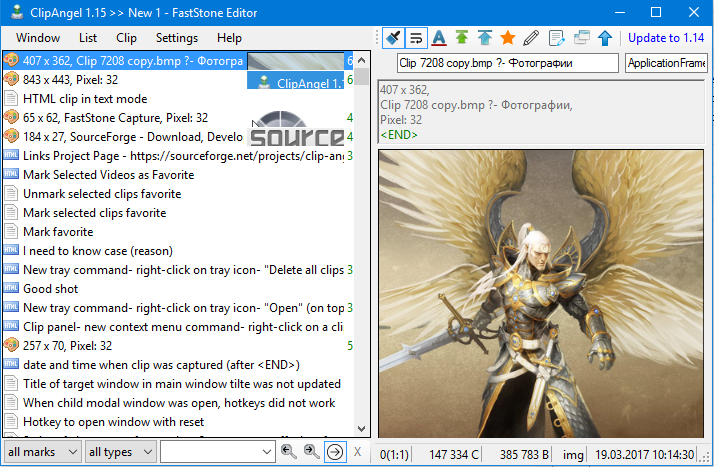 Download page for the app ClipAngel - Features
Supports clipboard formats: text, html, rtf, file, image Captures data of supported types copied to clipboard (clips) Captures sender window title and process name for clip Shows source URL for HTML clip Filter by marks 'Used (Pasted)' and 'Favorite' with keyboard shortcuts Filter by clip type Hot (as you type) text filter for clip list Stores last used for paste text filters Marking used (pasted) clips Marking filter matches in text Marking hyperlinks in text and Alt+click to open them Marking END of clip text Marking filter matches in list Allows to paste clip as original or plain text selected or all Repeated external copy of any previous clip raises it to top of list Settings 'Max clip size KB' and 'History depth number' Setting 'Hotkey to open window with reset' Multilanguage UI (Russian, English) Searching back and forward filter text in text Ability to delete and move clips in list Text filter and clip list share key presses, no need to change focus History is stored encrypted on disk Setting 'Hotkey to incremental paste' Switch 'word wrap' Switch 'move just pasted clip to top' Switch 'show column with short visible size of clip' Command 'Edit clip title' Edit clip text mode Commands 'Mark/Unmark favorite' for clips Support for format 'Clipboard Viewer Ignore' to respect password copy privacy Auto and manual check for new version and one click update Portable mode Auto position window on open near text input Switch 'Always on top' for window Command to open clip as file Command to simulate char input (for windows isolated from clipboard) Support for sending paste and input to elevated windows and more 
|
||||
|
|


