|
|
|
||||
|
|
Want a better software to manage your Web site more quickly and efficently? Click here for more info about EasyWebEditor...
Websites and CD DVD product catalogs with a single professional tool, in a single step? Yes it is possible: HyperPublish (BELOW!) FREE DOWNLOAD LINKS FOR: Vorbital Player 4.31 Vorbital Player is a free MP3, Ogg Vorbis, FLAC, AIFF, SND, Wavpack, and Wave file player. It uses OpenAL and is small and compact in order to take up as little screen space as possible (though you can, of course, resize the window if you would like a larger playlist). It will also display the album art for a track if it is present. (description, more information, click here - A free MP3, Ogg Vorbis, WAV, FLAC, AIFF, SND, and Wavpack file player.) File size: 12087 Kb Free Download link 1: Click here to start the download for Vorbital Player (then choose Save) Click here to start the download for Vorbital Player (then choose Save)WARNING: we suggest to scan the files with an antivirus before installing them - we do our best to screen each file reviewed on GetSoftware, but we don't re-scan them each day, and so, better safe than sorry! The download link was perfectly working at the time of our review and the related inclusion in this archive, and so when we did our last test; the download is not on our servers, it is provided by the software house and sometimes can be -temporarily- offline or so. Please kindly use the contact form to report difficulties, strange behaviors or persistent problems, and quote the program name or the number 7996 . Vorbital Player is a free MP3, Ogg Vorbis, FLAC, Wavpack, AIFF, SND, and Wave file player. It uses OpenAL for sound playback and displays the album art for a track if it is present.(A free MP3, Ogg Vorbis, WAV, FLAC, AIFF, SND, and Wavpack file player.)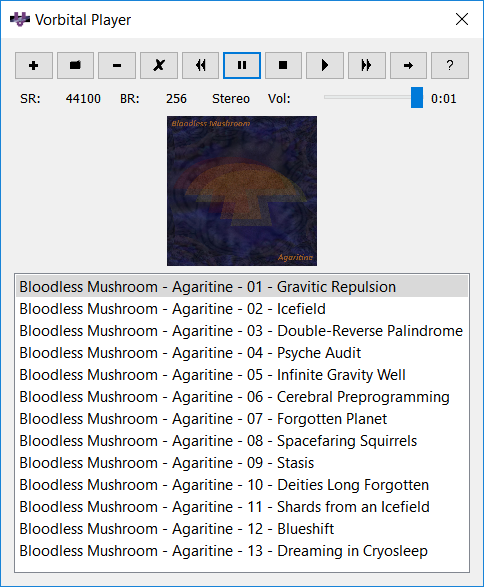 Download page for the app Vorbital Player - The Vorbital Player is a free MP3, Ogg Vorbis, FLAC, Wavpack, AIFF, SND, and Wave file player. It uses OpenAL and is small and compact in order to take up as little screen space as possible (though you can, of course, resize the window if you would like a larger playlist). It will also display the album art for a track if it is present.
The functions of most of the buttons are obvious, but just in case you can't tell at first glance the folder-shaped button on the left allows you to add a file to the playlist and the minus symbol allows you to remove a file from the playlist. Double-clicking on a file in the playlist will cause it to start playing. 
|
||||
|
|


