|
|
|
||||
|
|
Want a better software to manage your Web site more quickly and efficently? Click here for more info about EasyWebEditor...
Websites and CD DVD product catalogs with a single professional tool, in a single step? Yes it is possible: HyperPublish (BELOW!) FREE DOWNLOAD LINKS FOR: Second Copy 8.1.2.0 Copies files and folders from one location to another on the same drive, another drive or across the network. You can setup "profiles" that describe the source location, the destination location, and the frequency at which you want to copy the files. Second Copy monitors the source files for changes or additions and then automatically copies the new or changed files to their designated destination. (description, more information, click here - Automatic backup, compression,encryption, synchronization of files in background) File size: 6297 Kb Free Download link 1: Click here to start the download for Second Copy (then choose Save) Click here to start the download for Second Copy (then choose Save)Free Download link 2: http://www.centered.com/download/sc8.exeWARNING: we suggest to scan the files with an antivirus before installing them - we do our best to screen each file reviewed on GetSoftware, but we don't re-scan them each day, and so, better safe than sorry! The download link was perfectly working at the time of our review and the related inclusion in this archive, and so when we did our last test; the download is not on our servers, it is provided by the software house and sometimes can be -temporarily- offline or so. Please kindly use the contact form to report difficulties, strange behaviors or persistent problems, and quote the program name or the number 10214 . Backup files in the background automatically. Copies files and folders from one location to another on the same drive, another drive or across the network. Easy to use setup wizards to create "profiles" that define the criteria for backups.(Automatic backup, compression,encryption, synchronization of files in background)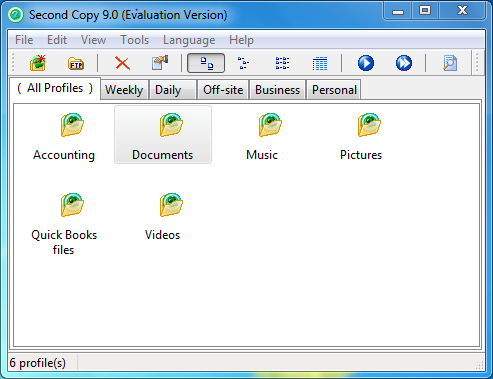 Download page for the app Second Copy - Second Copy copies files and folders from one location to another on the same drive, another drive or across the network. You can setup "profiles" that describe the source location, the destination location, and the frequency at which you want to copy the files. Second Copy monitors the source files for changes or additions and then automatically copies the new or changed files to their designated destination. An easy to use setup profile Wizard, makes configuration job a snap. Advanced options include PKZIP compatible compression, password protection, AES encryption, two-way directory synchronization and background thread priority control. You can also include or exclude specific file or sets of files from the copy and keep up to 25 old versions of files. Once you configure the profiles with your important file locations, the program sits as an icon in Windows "system tray" and unobtrusively copies files in the background. Copy files using FTP. Sends email notification after backup. Can be used to synchronize files between the desktop and laptop, or between two remote sites. Also useful for distributing software to several PCs on the network. Second Copy supports copying of open files using Windows Shadow Copy. It can also copy long filenames and supports unicode characters.

|
||||
|
|


