
|

|
|
|
|
Program type: Freeware File size: 12006 Kb Date: 06/21/2017 Homepage Install support: Install and Uninstall OS: Win2000, Win7 x32, Win7 x64, WinVista, WinVista x64, WinXP, Other Requirements: Windows Language: English, Chinese, ChineseTraditional, Japanese | photo transfer and cheap photo manager or the iPhone manager, good iPhone photo manager or also picture manager, transfer photos to iPhone and iPhone photos to PC or free get photos off iPhone and cheap download pictures from iPhone or the iPhone photo transfer | DearMob iPhone Photo Manager 1.1 [Homepage] - by: DearMob, Inc. - Download links for DearMob iPhone Photo Manager 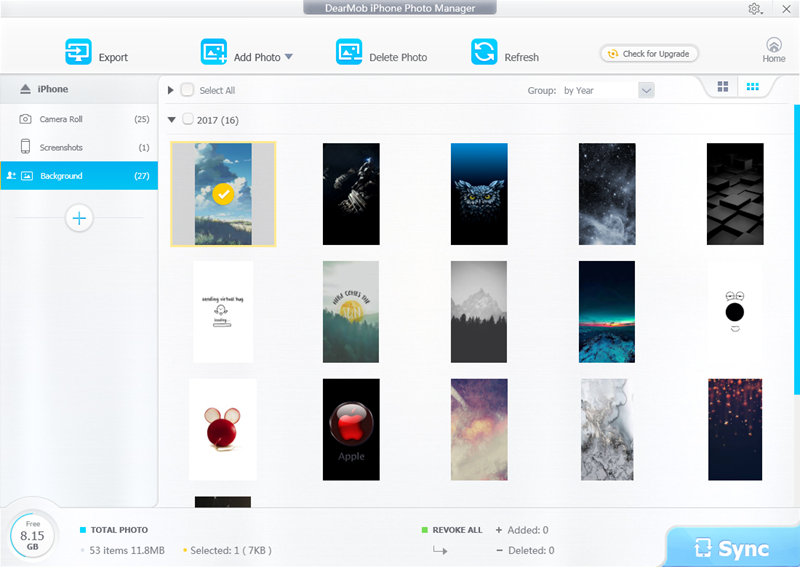 Click to enlarge Description: As a free and easy iPhone photo management software, DearMob iPhone Photo Manager provides transferring photos between iDevices and Windows PC. You can get photos off iPhone by exporting pictures from iPhone to computer. Photos can be grouped by day, month, year. You are allowed to transfer photos by selecting one or certain or all photos. Also it is able to create new albums to add photos or folder to iPhone iPad. Photo formats that are accepted by DearMob iPhone Photo Manager are .jpg, .jpeg, .png, .gif, .bmp, and .tiff. Newly created albums can be edit and delete with only one click. As for transferring speed, it is very fast, saving you much time of waiting. Besides, it delivers a super fast load of photos from your iPhone when connect it to computer. DearMob iPhone Photo Manager offers you enough flexibility in photo management. It auto replaces the existing files while transferring in case you forget which has been transferred. Photos can be viewed in large icons or small icons. And you can change the destination folder to export photos to. Moreover, if you are not satisfied with your operation before syncing, you are provided with undo or revoke all options. Main features of DearMob iPhone Photo Manager: 1. Fast Transfer photos between iDevices and Windows PC offline. 2. Create, edit and delete albums at ease. 3. Group photos in days, month or year. 4. Choose one, more or all photos for transferring. 5. Undo or revoke all photo adding or deleting before syncing. 6. Refresh to get real-time photos of iPhone iPad. 7. Support changing destination folder, and clearing Cache. 8. Intuitive interface. Safe and easy to use. No adware, no spyware, no virus. Recent changes in this Major Update: Remarks - Comments - Reviews (Add your opinion about this program) |
See also in Utilities and Hardware: File and Disk Management
|
|


 Download:


