
|

|
|
|
|
Program type: Freeware File size: 10604 Kb Date: 06/05/2016 Homepage Install support: Install and Uninstall OS: WinXP, WinVista, WinVista x64, Win7 x32, Win7 x64, Win2000, Windows2000, Windows2003, Windows Vista Ultimate, Windows Vista Ultimate x64, Windows CE, Windows Media Center Edition 2005, Windows Vista Starter, Windows Vista Home Basic, Windows Vista Home Premium, Windows Vista Business, Windows Vista Enterprise, Windows Vista Home Basic x64, Windows Vista Home Premium x64, Windows Vista Business x64, Windows Vista Enterprise x64, Windows 8, Windows Server 2012 Requirements: OS: WinXP/2K/2K3/Vista/Win7. Memory: 256MB. CPU: Celeron 1GHz Language: English | funny photo frames or the photo frames online, good photo frames fun or also desktop funny photo frames, desktop frames and widget photo frames | Photo Frames Fun 1.0 [Homepage] - by: Photo Fun Editor - Download links for Photo Frames Fun 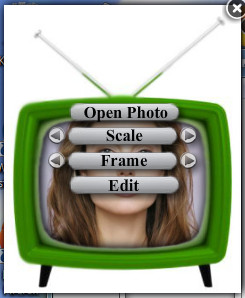 Click to enlarge Description: Funny photo frames - favorite photos on your desktop in a funny frame. This program allows you to choose , you arrange and place on the desktop of your favorite photos. Your choice of many photo frames for decoration. Program is very easy to use . Once installed, the widget will automatically appear on your desktop. Drag it to any convenient place on your desktop. Press - to open the photo. Select a photo from your computer , in the format jpg, png or gif. Photos will appear in the program. Then clicking on the arrow next to the button frame , leafing through photo frames, choose your favorite . You can add an inscription on the photo frame. For example - my love . Click on the text, a flashing cursor appears . Enter any text. You can choose the size of photo and picture frames . Press the arrows next to the button scale . Choose Your Size . The program automatically at startup windows. You can remove the program from startup . To do this, click Start - Startup delete icon funny photo frames. Program funny photo frames - will help you see the photos of your favorite not only on the table next to the computer , but also on the desktop of your computer screen . Recent changes in this New Release: Remarks - Comments - Reviews (Add your opinion about this program) |
See also in Graphic Painting and Drawing: Miscellaneous and all-in-one
|
|


 Download:


