|
|
|
||||
|
|
Want a better software to manage your Web site more quickly and efficently? Click here for more info about EasyWebEditor...
Websites and CD DVD product catalogs with a single professional tool, in a single step? Yes it is possible: HyperPublish (BELOW!) FREE DOWNLOAD LINKS FOR: IDM Backup Manager 1.0.0 A lightweight, user-friendly and intuitive application designed to backup, password-protect and restore files used by Internet Download Manager (description, more information, click here - Backup your Internet Download Manager and restore it later) File size: 1865 Kb Free Download link 1: Click here to start the download for IDM Backup Manager (then choose Save) Click here to start the download for IDM Backup Manager (then choose Save)WARNING: we suggest to scan the files with an antivirus before installing them - we do our best to screen each file reviewed on GetSoftware, but we don't re-scan them each day, and so, better safe than sorry! The download link was perfectly working at the time of our review and the related inclusion in this archive, and so when we did our last test; the download is not on our servers, it is provided by the software house and sometimes can be -temporarily- offline or so. Please kindly use the contact form to report difficulties, strange behaviors or persistent problems, and quote the program name or the number 7839 . A lightweight, user-friendly and intuitive application designed to backup, password-protect and restore files used by Internet Download Manager(Backup your Internet Download Manager and restore it later)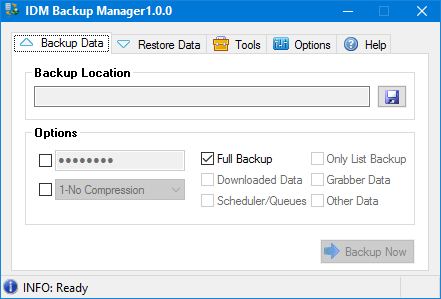 Download page for the app IDM Backup Manager - IDM Backup Manager is a lightweight backup alternative for profiles stored inside Internet Download Manager (IDM for short) that can also clean up your IDM configuration.Its a recommendable choice for IDM users, seeing as backup and restore operations are made available as one-click operations. It also benefits from a toolset for removing unnecessary IDM data.IDM Backup Manager is presented inside a tiny interface, without eye candying elements, but it is intuitive nonetheless. It goes straight to the point by providing a few backup options directly in the main GUI.Because it automatically detects IDM installations, it only requires that you select the output folder for the backups that will be generated and provides a few extras for advanced users.If you go for the full backup, then all of the IDM data, including downloads, scheduler, grabber, history and logs, will be backed up automatically. Alternatively, the custom mode allows you to make a selection of the items enumerated above.You can also password protect the output backup file, as well as to select one of the available compression methods (the process can be done without compression at all, but in order to gain space you can opt for a range of scenarios, from normal to ultra which is the ultimate level of compression).Depending on the size of your IDM data, the duration of the backup process can vary. In case you want to perform a restore process, you will be required to provide the path to the backup file, as well as the password you used for protecting the file (if any).The cleaning toolset provides utilities for removing obsolete data from IDM, including login passwords.All in all, IDM Backup Manager helps you to build a backup solution for situations where you want to restore IDM to a previous configuration without using complex backup software.

|
||||
|
|


