|
|
|
||||
|
|
Want a better software to manage your Web site more quickly and efficently? Click here for more info about EasyWebEditor...
Websites and CD DVD product catalogs with a single professional tool, in a single step? Yes it is possible: HyperPublish (BELOW!) FREE DOWNLOAD LINKS FOR: X-NetStat 6.0.0.30 X-NetStat monitors your current Internet and network connections. Information shown includes local and remote addresses, ports, connection status, connection age, bandwidth used, location, and the program/process behind it. Includes Auto-WHOIS lookup tools, firewall integration, network statistics (Interface, TCP, IP, UDP, ICMP), a rules system, and many more features. It's like Inte network radar, and you can even block unwanted connections. (description, more information, click here - Monitor your Internet and network connections. With IP Lookup tools & more.) File size: 77426 Kb Free Download link 1: Click here to start the download for X-NetStat (then choose Save) Click here to start the download for X-NetStat (then choose Save)WARNING: we suggest to scan the files with an antivirus before installing them - we do our best to screen each file reviewed on GetSoftware, but we don't re-scan them each day, and so, better safe than sorry! The download link was perfectly working at the time of our review and the related inclusion in this archive, and so when we did our last test; the download is not on our servers, it is provided by the software house and sometimes can be -temporarily- offline or so. Please kindly use the contact form to report difficulties, strange behaviors or persistent problems, and quote the program name or the number 8029 . X-NetStat shows your current Internet and network connections (addresses, ports used, traffic, age, location, process EXE, status). Includes IP lookup Tools, Network Statistics, a Rules system, LAN scanner, a Port Database, and more.(Monitor your Internet and network connections. With IP Lookup tools & more.)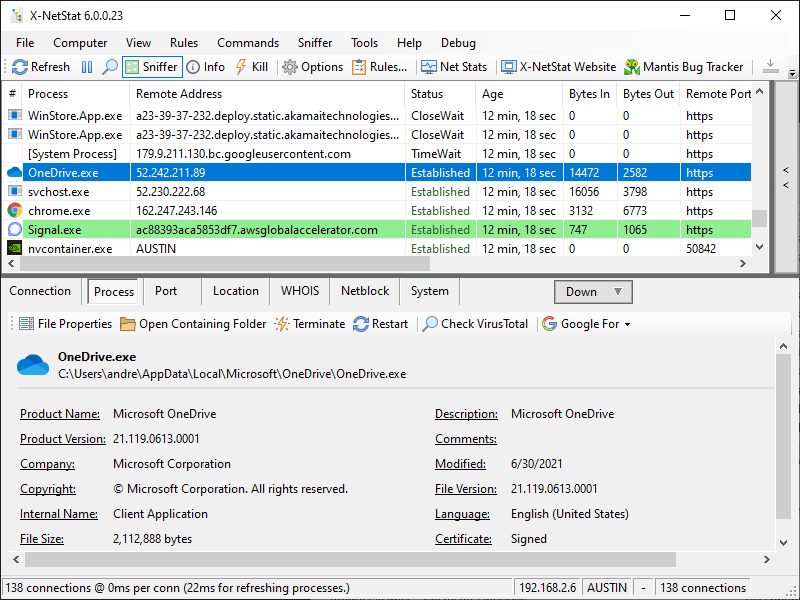 Download page for the app X-NetStat - X-NetStat shows your current Internet and network connections in realtime. These connections are established each time you visit a web page, send an instant message, check your email, or anytime you do network activity that requires you to connect to another computer. They also appear when outside computers attempt to connect to your machine, authorized or not.
Information shown includes local and remote addresses, local and remote ports, the status, the age of the connection, how much bandwidth/traffic the connection is using, the program EXE behind it, geographical information, and more. It's kind of like Inte network radar, and you can even kill unwanted connections. There are additional features geared toward network administrations, like Windows Firewall integration, a Rules system to set up actions based on network conditions, line-speed and hop detection, a Network Statistics window displaying information on network interfaces and protocols, a Port Database, WHOIS client, local network scanner, and more. 
|
||||
|
|


