|
|
|
||||
|
|
Want a better software to manage your Web site more quickly and efficently? Click here for more info about EasyWebEditor...
Websites and CD DVD product catalogs with a single professional tool, in a single step? Yes it is possible: HyperPublish (BELOW!) FREE DOWNLOAD LINKS FOR: Z-FTPcopyII 3.8 The Z-FTPcopy module is a command line tool, that means it is controlled by command line parameters. This permits a scheduled FTP transfer with the integrated Windows task planner or with Z-Cron. Z-FTPcopy was originally designed as an extension for Z-Cron, but you can also use it as a standalone program for an easy and fast transfer of a data backup to a FTP server. (description, more information, click here - Z-FTPcopy - Transferring data on a FTP server automatically, time controlledly) File size: 4622 Kb Free Download link 1: Click here to start the download for Z-FTPcopyII (then choose Save) Click here to start the download for Z-FTPcopyII (then choose Save)WARNING: we suggest to scan the files with an antivirus before installing them - we do our best to screen each file reviewed on GetSoftware, but we don't re-scan them each day, and so, better safe than sorry! The download link was perfectly working at the time of our review and the related inclusion in this archive, and so when we did our last test; the download is not on our servers, it is provided by the software house and sometimes can be -temporarily- offline or so. Please kindly use the contact form to report difficulties, strange behaviors or persistent problems, and quote the program name or the number 9435 . The Z-FTPcopy module is a command line tool, that means it is controlled by command line parameters. This permits a scheduled FTP transfer with the integrated Windows task planner or with Z-Cron.(Z-FTPcopy - Transferring data on a FTP server automatically, time controlledly)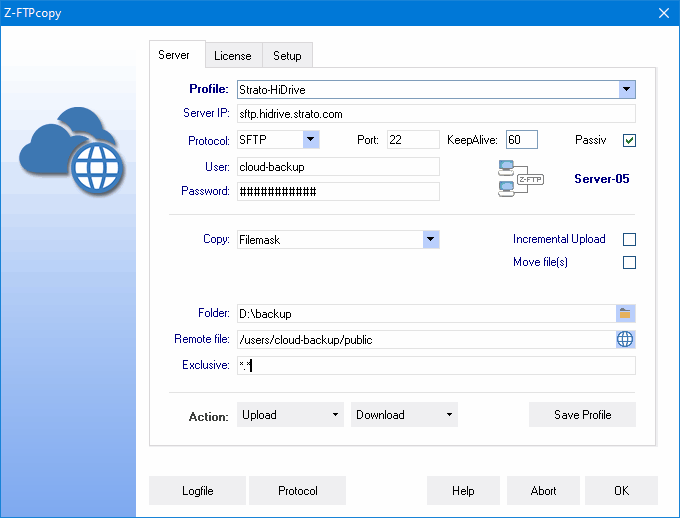 Download page for the app Z-FTPcopyII - The Z-FTPcopy module provide Z-Cron with the possibility to copy an archive or a backup file to every server that is capable of handling FTP (RFC 959 specification). The only requirement is a FTP server with enough free disc space (Maybe no Windows host ?). You have to state the following information: IP address of the FTP server, a valid login account and the internal path where the data should be stored. The module Z-FTPcopy allows the storage of data in a heterogeneous environment outside the original backup network.
The program is a command line tool, that means it is controlled by command line parameters. This permits a scheduled FTP transfer with the integrated Windows task planner or with Z-Cron. Z-FTPcopy was originally designed as an extension for Z-Cron, but you can also use it as a standalone program for an easy and fast transfer of a data backup to a FTP server. To the start of Z-FTPcopyII without parameters the main window is represented. Files or directories can be copied by this window also in the direct dialog. 
|
||||
|
|


